Making Pay/Return decisions
You can use Positive Pay as a fraud prevention service to access on any device at any time to make Pay/Return decisions that are identified as exceptions by your FI per the check issue files you sent to your FI.
Note: Positive Pay is ideal for companies that issue high volumes of check items for large dollar amounts.
To make Pay/Return decisions
- In the navigation , click or tap Services > Positive Pay. The Positive Pay page appears.
- Select an account in the accounts drop-down list, or search for an account in the search field.
- From the Exceptions drop-down list, select Decisions Needed, Decisioned, or All.
- Select an Exception you want to pay or return. The transaction details appear in the right pane.
- In the transaction details pane, do one of the following:
- Select the Pay radio button.
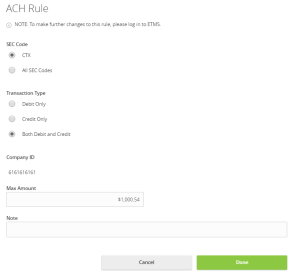
- Click or tap the +ACH Rule button. The ACH Rule window appears.
- Select an SEC Code.
- Select a Transaction Type.
- (Optional) Edit the Max Amount.
- (Optional) Enter a Note.
- Click or tap Done.
- Select the Return radio button.
- Select a reason in the drop-down list.
- Select the Pay radio button.
- Complete steps 3-5 for multiple exceptions.
- Click or tap Submit All Decisions.
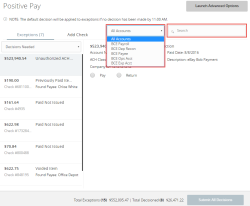
Note: For more Positive Pay features, click or tap the Launch Advanced Options button in the top right corner of the Positive Pay page.