Adding manual accounts or assets
You can manually add accounts or assets within Personal Financial Management to help build a picture of your financial portfolio in a single, convenient location. This feature is helpful if you want your Net Worth tool to include other assets, such as your house or car. Because manual accounts do not actually link an external account or asset, these accounts and assets will not update in real time. If the value of manually added accounts or assets change, you must update them manually.

To add a manual account or asset
- Navigate to the Home page and scroll down to the Add a Manual account section.
- Select Add a Manual account.
- In the Add a Manual account window, enter your information in the following fields:
- Account name
- Account type
- Balance
- Select Save to confirm your changes.
- In the Success window, select Done.
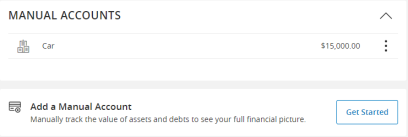
To add manual accounts or assets
- On the Home page, select Net Worth in the tools menu.
- Select Add Asset.
- Enter a Name and Amount for the account or asset.
- Select Save.
The account or asset now appears under Total Assets and is included in your net worth.