Cash Flow
The Cash Flow tool allows you to view your deposit and spending history and predict account balances, income, and expenses for up to 30 days in the future. You can add your income, bills, payments, and recurring subscriptions, with frequency options such as one-time, monthly, quarterly, or annual, and estimate how a new recurring expense will impact your future available cash.

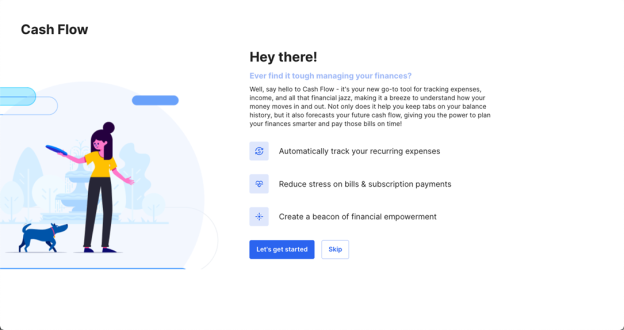
The first time you open the Cash Flow tool, the Cash Flow tool wizard will launch. Select Let's get started to add your income or Skip to add your income later.
After completing the Cash Flow tool wizard, you can view your projected balances on all accounts and view estimated balances in the near future. The following image shows the Cash Flow tool with annotations. The numbered elements are described below.
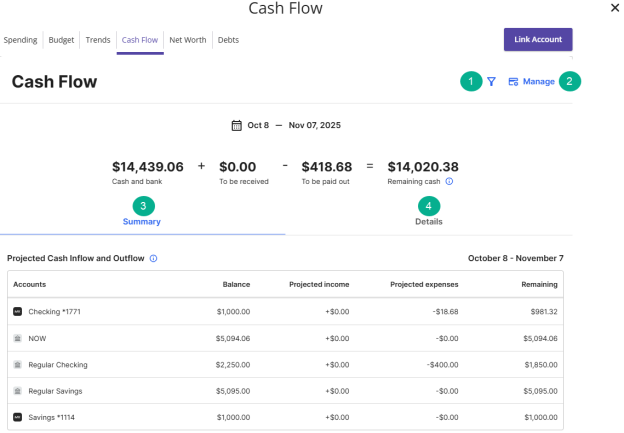
- Filter the displayed accounts to focus on specific accounts.
- Manage recurring transactions and income for the specified accounts.
- View a summary of active accounts and projections for the specified accounts within the currently selected time frame.
- View additional details, such as account expenses and remaining cash for the specified accounts within the currently selected time frame.
- Select Manage
 .
.
- Select an expense to view its details or change the recurring payment schedule.
- Select a paid transaction.
- Configure the Category, Date, Memo, and Tags as needed.
- Configure any of the Actions as needed.