Debts
The Debts tool allows you to see all of your debt accounts in one place and to calculate how making additional payments, or applying a different paydown strategy, can impact your debt over time. The system will calculate paying off your debt using the Snowball method. This method helps you pay off your debt in the fastest way possible, by rolling the monthly amount you have been applying to a specific debt to the next debt in the priority list.
The main view is the trending graph for paying off all of your debt.
Using the Debts tool
-
Select an account to edit details and view an individual payoff graph.
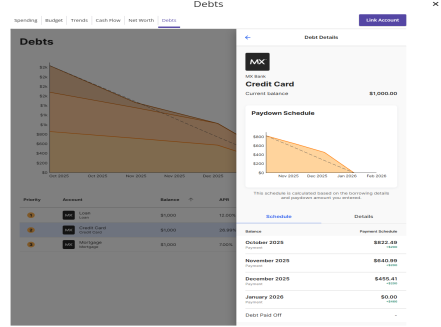 Note: The colors in the graph correspond to the numbers beside each account. Payoff dates and the amount you save are automatically calculated by the details you input for each debt. The dotted line reflects time and money savings from using the Snowball method.
 -
From the dashboard,
selectWhat is Snowballing? in the
Debt-free by message box to see how Snowballing helps you pay down your debt more quickly.
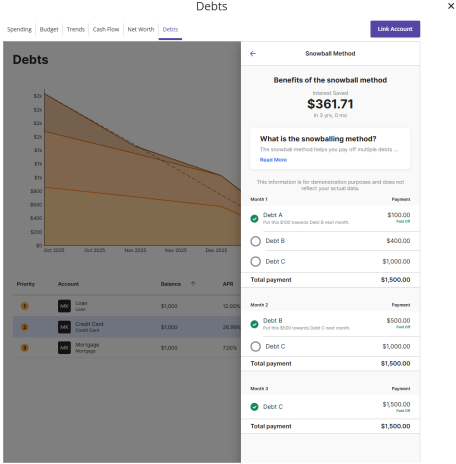
If you don’t want to use the Fastest Payoff First method, you can set the priority to Highest Interest First, Lowest Balance First, or Highest Balance First by selecting the dropdown menu in the navigation bar. It is important for you to find a strategy that meets your needs and will help you succeed in eliminating debt.
- Fastest Payoff First—debts are ordered by which debt you will pay off soonest based on balance, annual percentage rate (APR), and minimum payment. Your additional amount towards your debts is applied in that order as you pay off your debts.
- Highest Interest First—debts are ordered from your highest APR to the lowest APR. Your additional amount towards your debts is applied in that order as you pay off your debts.
- Lowest Balance First—debts are ordered by balance amount from lowest to highest. Your additional amount towards your debts is applied in that order as you pay off your debts.
- Highest Balance First—debts are ordered by balance amount from highest to lowest. Your additional amount towards your debts is applied in that order as you pay off your debts.