System requirements
Browser requirements
Q2 Co-Pilot supports the same browsers as digital banking, including:
- Google Chrome on Windows (Current and previous two versions)
- Google Chrome on Mac OS X (Current and previous two versions)
- Mozilla Firefox on Windows (Current and previous two versions)
- Mozilla Firefox on Mac OS X (Current and previous two versions)
- Microsoft Edge on Windows (Current and previous two versions, starting with 79.0.309)
- Safari on Mac OS X (Current and previous two versions)
System requirements
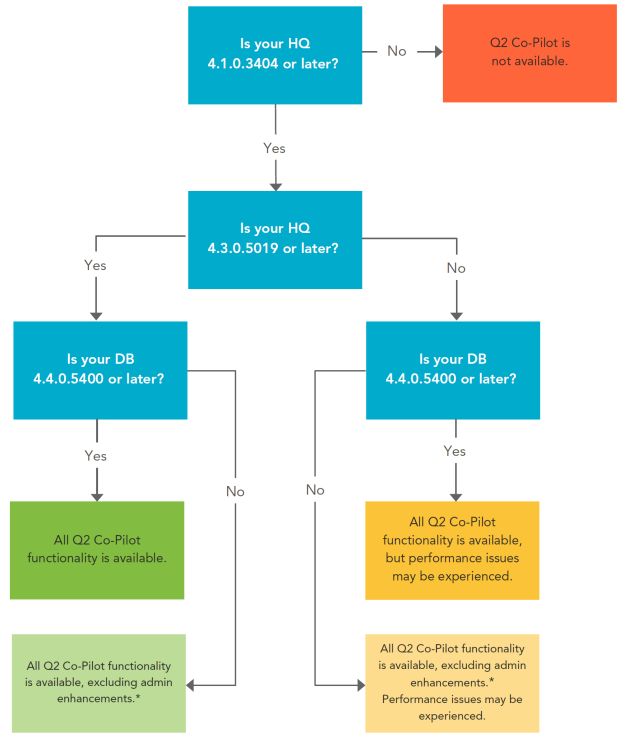
In order to use some of the new features in Q2 Co-Pilot, some areas of the Q2platform are required to be a more recent version. This page contains the system specifications for Q2 Co-Pilot to find out which features are available for your financial institution.
| HQ Version | DB version | |
|---|---|---|
| 4.4.0.5400 and later | 4.4.0.5399 and earlier | |
| 4.3.0.5019 and later | All Q2 Co-Pilot functionality is available. | All Q2 Co-Pilot functionality is available, excluding admin enhancements.* |
| 4.3.0.5918 to 4.1.0.3404 | All Q2 Co-Pilot functionality is available, but performance issues may be experienced. | All Q2 Co-Pilot functionality is available, excluding admin enhancements.* Performance issues may be experienced. |
| 4.1.0.3403 and earlier | Q2 Co-Pilot is not available. | Q2 Co-Pilot is not available. |
*Admin enhancements include:
- View, add, and delete Secure Access Code (SAC) contacts
- View unmasked SACs (if configured to be masked)
- Enable and disable User status
Below is a flowchart to easily find out what features are available based on your FI's system specification.